Deploying Serverless GPU Multinode Workloads on Databricks
Explore how to efficiently deploy serverless GPU multinode workloads using Databricks. Learn about the underlying architecture, practical implementation, and common pitfalls to avoid.
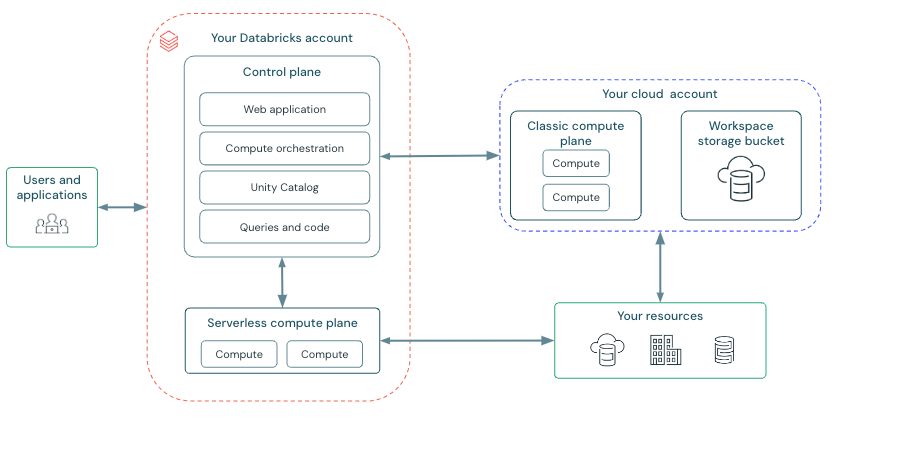
In the realm of machine learning and data processing, the demand for GPU-accelerated computing has surged, driven by the need to handle increasingly complex models and datasets. However, managing GPU infrastructure can be a daunting task, often requiring significant time and resources. Databricks' Serverless GPU API offers a compelling solution by simplifying the deployment of multinode GPU workloads, allowing engineers to focus on model development rather than infrastructure management.
Why Serverless GPU Matters
Serverless GPU computing on Databricks is designed to streamline the execution of distributed workloads, particularly those requiring substantial computational power. By leveraging serverless architecture, you can dynamically allocate GPU resources without the overhead of managing physical hardware. This is particularly beneficial for machine learning tasks such as training large models or processing extensive datasets, where the ability to scale resources efficiently can significantly impact performance and cost-effectiveness [1][2].
Understanding the Serverless GPU API
The Serverless GPU API is a lightweight library that integrates seamlessly with Databricks notebooks, enabling the execution of multi-GPU and multinode workloads. It provides decorators like @distributed and @ray_launch to facilitate distributed execution. These decorators handle the serialization and distribution of functions across GPUs, ensuring that the environment is synchronized across all nodes [1].
When using the API, you specify GPU-related parameters such as count and type within the decorator. Environment variables and dependencies are managed outside the decorator, ensuring that your environment is consistent across all executions. This separation of concerns simplifies configuration and enhances reproducibility [1][2].
Walking Through a Deployment
To deploy a serverless GPU workload, you begin by selecting the appropriate compute resources within your Databricks environment. For instance, if you're using H100 GPUs, you would select these from the compute selector and apply the configuration [4].
Here's a basic example of how you might set up a distributed training task:
from serverless_gpu import distributed

@distributed(gpu_count=8, gpu_type='H100', remote=True)
def train_model(data_path):
    import torch
    # Load data
    data = torch.load(data_path)
    # Define model
    model = torch.nn.Linear(data.size(1), 1)
    # Train model
    optimizer = torch.optim.SGD(model.parameters(), lr=0.01)
    loss_fn = torch.nn.MSELoss()
    for epoch in range(100):
        optimizer.zero_grad()
        output = model(data)
        loss = loss_fn(output, data)
        loss.backward()
        optimizer.step()
    return model

train_model.distributed('/dbfs/data/training_data.pt')
In this example, the @distributed decorator specifies that the function should run on 8 H100 GPUs in a remote setting. The function itself is a simple PyTorch training loop, demonstrating how you can leverage the API to distribute tasks across multiple GPUs [1][4].
Common Mistakes and Pitfalls
One common mistake when deploying serverless GPU workloads is neglecting to specify the GPU type, especially when running remotely. This can lead to suboptimal performance or even failed executions. Always ensure that the gpu_type parameter is set appropriately [1].
Another issue is the management of dependencies. Since serverless environments do not support init scripts, all dependencies must be explicitly installed using %pip install commands. Failing to do so can result in runtime errors due to missing packages [6].
When to Use Serverless GPU
Serverless GPU workloads are ideal for scenarios where computational demand is variable or unpredictable. They are particularly suited for large-scale machine learning tasks, such as training deep learning models or performing complex simulations. However, for workloads that require consistent and predictable performance, traditional GPU clusters might still be preferable due to their dedicated resources and stable environment [8].
In conclusion, Databricks' Serverless GPU API provides a powerful tool for deploying multinode GPU workloads with minimal infrastructure overhead. By understanding the API's architecture and best practices, you can effectively harness the power of GPUs to accelerate your data processing and machine learning tasks.
- Overview — Serverless GPU API 0.5.2 documentationhttps://api-docs.databricks.com/python/serverless_gpu/overview.html
- Welcome to Serverless GPU API’s documentation! — Serverless GPU API 0.5.2 documentationhttps://api-docs.databricks.com/python/serverless_gpu/index.html
- August 2025 | Databricks on AWShttps://docs.databricks.com/aws/en/release-notes/product/2025/august
- Get started: Serverless GPU compute with H100 GPUs - Azure Databricks | Microsoft Learnhttps://learn.microsoft.com/en-us/azure/databricks/machine-learning/ai-runtime/examples/tutorials/sgc-api-h100-starter
- Get started: Serverless GPU compute with H100 GPUs | Databricks on AWShttps://docs.databricks.com/aws/en/machine-learning/ai-runtime/examples/tutorials/sgc-api-h100-starter
- Best practices for serverless compute | Databricks on AWShttps://docs.databricks.com/aws/en/compute/serverless/best-practices
- User guides for AI Runtime | Databricks on AWShttps://docs.databricks.com/aws/en/machine-learning/ai-runtime/guides
- Introducing AI Runtime: Scalable, Serverless NVIDIA GPUs on Databricks for Training and Finetuning | Databricks Bloghttps://www.databricks.com/blog/introducing-ai-runtime-scalable-serverless-nvidia-gpus-databricks-training-and-finetuning
Be the first to comment
One email a morning. The day's playbooks for you.
Pick the categories you care about (or leave blank for everything). The digest is ranked by what you've actually been reading on this device, so it sharpens over time.