Implementing Model Context Protocol for Secure Agent Interactions on GCP
The Model Context Protocol (MCP) offers a standardized way for AI agents to securely interact with external data sources and services on Google Cloud. This article explores how to implement MCP for secure and efficient agent interactions, addressing operational and security challenges.
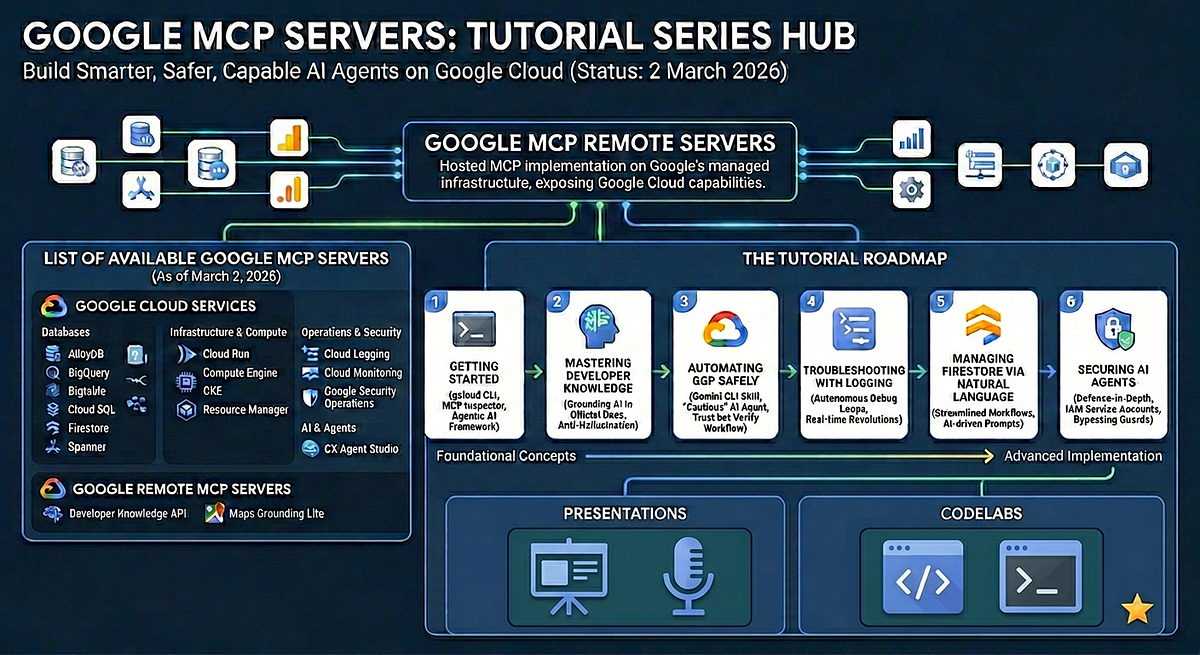
In the rapidly evolving landscape of AI and machine learning, one persistent challenge is enabling AI models to interact securely and efficiently with external data sources. This is particularly crucial for large language models (LLMs) that need to access real-time data to provide accurate and up-to-date responses. The Model Context Protocol (MCP) emerges as a solution, offering a standardized framework that simplifies these interactions by reducing the complexity of integrating multiple external services [1][2].
Why MCP Matters for AI Agents
The traditional approach to integrating AI models with external systems involves creating custom connectors for each service, leading to a complex N×M integration problem. This not only increases development time but also introduces potential security vulnerabilities. MCP addresses these issues by providing a unified protocol that allows AI agents to dynamically discover and interact with external tools and data sources [1]. This is akin to having a universal adapter for AI systems, enabling seamless connectivity without the need for bespoke integrations.
In practice, MCP allows AI models to move beyond their static training data, accessing live data from enterprise systems and other external sources. This capability is essential for applications that require real-time data processing, such as customer support agents or financial analytics tools, where outdated information can lead to incorrect decisions [2].
Implementing MCP on Google Cloud
Implementing MCP on Google Cloud involves several steps, from setting up the necessary infrastructure to configuring security protocols. Google Cloud offers a fully managed MCP server for BigQuery, which simplifies the process by providing a direct, secure way to analyze data without extensive management overhead [6].
Setting Up the Environment
To begin, you need to set up a Google Cloud Project with billing enabled and ensure that your user account has the necessary permissions, such as roles/bigquery.user and roles/mcp.toolUser [6]. Once the environment is ready, enable the BigQuery and MCP APIs using the Google Cloud CLI:
gcloud services enable bigquery.googleapis.com
Configuring Security with Model Armor
Security is a critical concern when deploying AI agents that interact with external data. Google Cloud's Model Armor provides a robust security layer by inspecting and sanitizing MCP tool calls and responses. This integration helps mitigate risks such as prompt injection and sensitive data disclosure, ensuring that all interactions adhere to organizational security policies [3].
Building an AI Agent with ADK
Using the Agent Development Kit (ADK), you can build AI agents that leverage the MCP to access BigQuery data. The ADK simplifies the process by providing built-in support for tool integration, allowing agents to perform actions like querying databases or invoking external APIs [5].
from adk import Agent

agent = Agent()
agent.add_tool('bigquery', bigquery_tool)
This snippet demonstrates how to add a BigQuery tool to an AI agent, enabling it to perform data analysis tasks directly through the MCP server.
Common Mistakes and How to Avoid Them
One common mistake when implementing MCP is neglecting to configure proper access controls. Without appropriate permissions, AI agents may either fail to access necessary data or inadvertently expose sensitive information. It's crucial to use Google Cloud's IAM roles and policies to define who can access what resources [4].
Another pitfall is underestimating the complexity of integrating multiple MCP servers. While MCP simplifies the process, each server may have unique requirements or configurations that need to be addressed individually.
When to Use MCP
MCP is particularly beneficial for applications that require real-time data access and interaction with multiple external systems. It is ideal for environments where security and scalability are paramount, such as financial services or healthcare. However, for simpler applications with limited data integration needs, the overhead of implementing MCP may not be justified.
In conclusion, the Model Context Protocol provides a powerful framework for enabling secure and efficient AI agent interactions on Google Cloud. By standardizing the way AI models connect with external systems, MCP not only reduces integration complexity but also enhances the security and scalability of AI applications.
- What is the Model Context Protocol (MCP)? | Databrickshttps://www.databricks.com/blog/what-is-model-context-protocol
- What is Model Context Protocol (MCP)? A guide | Google Cloudhttps://cloud.google.com/discover/what-is-model-context-protocol
- Overview | Model Armor | Google Cloud Documentationhttps://docs.cloud.google.com/model-armor/integrations
- Model Context Protocol (MCP) on Databricks | Databricks on Google Cloudhttps://docs.databricks.com/gcp/en/generative-ai/mcp/
- Tools Make an Agent: From Zero to Assistant with ADK | Google Cloud Bloghttps://cloud.google.com/blog/topics/developers-practitioners/tools-make-an-agent-from-zero-to-assistant-with-adk
- Using the fully managed remote BigQuery MCP server to build data AI agents | Google Cloud Bloghttps://cloud.google.com/blog/products/data-analytics/using-the-fully-managed-remote-bigquery-mcp-server-to-build-data-ai-agents
- Agent endpoints | Google Cloud Contact Center as a Service | Google Cloud Documentationhttps://docs.cloud.google.com/contact-center/ccai-platform/docs/manager-api-agent
- Best practices for implementing machine learning on Google Cloud | Cloud Architecture Center | Google Cloud Documentationhttps://docs.cloud.google.com/architecture/ml-on-gcp-best-practices
Be the first to comment
One email a morning. The day's playbooks for you.
Pick the categories you care about (or leave blank for everything). The digest is ranked by what you've actually been reading on this device, so it sharpens over time.