Mastering AI-Driven Self-Service in Dynamics 365 Contact Center
AI-driven self-service in Dynamics 365 Contact Center transforms customer interactions by leveraging generative AI to enhance efficiency and satisfaction. This article explores the practical implications and challenges of implementing these capabilities.
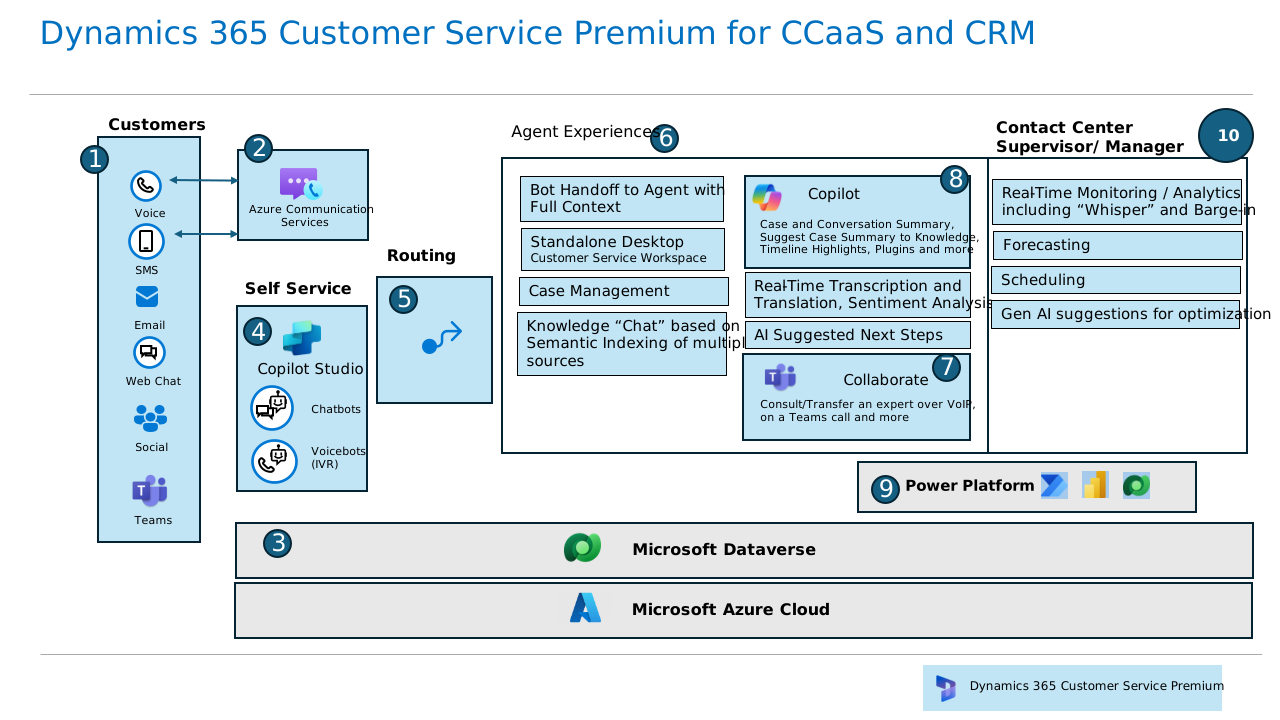
In the evolving landscape of customer service, the demand for efficient and intelligent self-service options has never been higher. Dynamics 365 Contact Center is at the forefront of this transformation, integrating AI-driven self-service capabilities that promise to revolutionize how businesses interact with their customers. But what does this mean in practice, and how can organizations effectively harness these capabilities?
The Promise of AI-Driven Self-Service
Dynamics 365 Contact Center's AI-driven self-service features are designed to streamline customer interactions by leveraging generative AI. This technology allows for the creation of conversational IVRs (Interactive Voice Responses) and AI agents that can autonomously handle customer queries, reducing the need for human intervention and improving operational efficiency [2]. These AI agents are capable of understanding customer intents, providing real-time knowledge management, and even autonomously leading conversations based on predefined business instructions [7].
The integration of AI into self-service scenarios is not just about reducing costs; it's about enhancing the customer experience. By providing accurate, timely responses and enabling customers to resolve issues on their own, businesses can significantly boost customer satisfaction and loyalty.
Practical Implementation Challenges
While the benefits are clear, implementing AI-driven self-service in a contact center environment is not without its challenges. One of the primary hurdles is ensuring that the AI systems are properly trained and configured to handle the wide variety of queries that customers might present. This requires a robust intent library, which can be built by analyzing past interactions and continuously updating the AI's knowledge base [7].
Another challenge is the integration of these AI capabilities with existing CRM systems. Dynamics 365 Contact Center offers extensibility options that allow for integration with non-Microsoft CRM solutions, but this can still be a complex process that requires careful planning and execution [4]. Ensuring seamless interoperability is crucial to avoid disrupting existing workflows and to maintain a consistent customer experience across all channels.
Operational Realities and Scaling
In practice, the deployment of AI-driven self-service capabilities can significantly reduce the workload on human agents, allowing them to focus on more complex cases that require a human touch. However, this shift also necessitates changes in how contact centers are managed. Supervisors need to be equipped with tools to monitor AI performance and intervene when necessary. Dynamics 365 provides supervisors with access to key operational metrics, enabling them to oversee AI interactions and ensure that they align with business goals [2].
As organizations scale their use of AI-driven self-service, they must also consider the potential for increased complexity in managing these systems. The more capabilities are added, the greater the need for robust governance frameworks to ensure compliance, especially when handling sensitive customer data [7].
Engineering Tradeoffs and Limitations
Adopting AI-driven self-service in Dynamics 365 Contact Center involves several tradeoffs. While the automation of routine tasks can lead to significant cost savings and efficiency gains, it also requires upfront investment in AI training and system integration. Additionally, there is the risk of over-reliance on AI, which could lead to customer dissatisfaction if the AI fails to adequately resolve issues or if customers prefer human interaction for certain queries.
Moreover, while AI can handle a wide range of queries, it may struggle with edge cases or complex scenarios that fall outside its training data. Organizations must be prepared to handle these exceptions and ensure that there are clear escalation paths to human agents when necessary.
Conclusion: Strategic Recommendations
For organizations looking to master AI-driven self-service in Dynamics 365 Contact Center, the key is to start small and scale gradually. Begin by identifying the most common customer queries that can be automated and focus on building a robust intent library. Invest in training AI systems and ensure that there is a strong governance framework in place to manage compliance and data security.
Ultimately, the successful implementation of AI-driven self-service requires a strategic approach that balances automation with human oversight. By doing so, organizations can not only enhance customer satisfaction but also achieve significant operational efficiencies, positioning themselves as leaders in the customer service landscape.
- Dynamics 365 Contact Center | Microsoft Learnhttps://learn.microsoft.com/en-us/dynamics365/contact-center/
- Overview of Dynamics 365 Contact Center 2025 release wave 2 | Microsoft Learnhttps://learn.microsoft.com/en-us/dynamics365/release-plan/2025wave2/service/dynamics365-contact-center/
- Sample library for Customer Service - Dynamics 365 | Microsoft Learnhttps://learn.microsoft.com/en-us/dynamics365/guidance/resources/component-library
- Overview of Dynamics 365 Contact Center 2024 release wave 2 | Microsoft Learnhttps://learn.microsoft.com/en-us/dynamics365/release-plan/2024wave2/service/dynamics365-contact-center/
- Agents, Copilot, and AI capabilities in Dynamics 365 apps - Dynamics 365 | Microsoft Learnhttps://learn.microsoft.com/en-us/dynamics365/copilot/ai-get-started
- Welcome to Dynamics 365 Contact Center | Microsoft Learnhttps://learn.microsoft.com/en-us/dynamics365/contact-center/implement/overview-contact-center
- Responsible AI FAQ for AI agents | Microsoft Learnhttps://learn.microsoft.com/en-us/dynamics365/contact-center/implement/faq-rai-ai-agents
- Microsoft Dynamics 365 Business Central documentation - Business Central | Microsoft Learnhttps://learn.microsoft.com/en-us/dynamics365/business-central/
Be the first to comment
One email a morning. The day's playbooks for you.
Pick the categories you care about (or leave blank for everything). The digest is ranked by what you've actually been reading on this device, so it sharpens over time.