Fabric IQ මුල ඉඳන්ම: මොකක්ද, ඇයි වැදගත්, ඔයාගේ පළමු Ontology එක හදාගන්නේ කොහොමද
Data පැත්තේ ටික කාලයක් වැඩ කරලා තියෙනවා නම්, මේ නිහඬ කරදරය ඔයා හොඳට දන්නවා. Warehouse එක පිරිලා තියෙන්නේ factsales, dimstore, dimproducts වගේ tables වලින්. ඒත් business එක කතා කරන්නේ customers, shipments, cold-chain breaches ගැන. කවුරුහරි "සරල" ප්රශ්නයක් ඇහුවම, domain expert කෙනෙක්ට වාඩි වෙලා ඒක joins, filters, column names වලට හරවන්න වෙනවා. හැමෝගෙම වැඩ හිර කරන්නේ හැම පාරම ගෙවන්න වෙන මේ translation බද්ද — Fabric IQ හදලා තියෙන්නෙත් හරියටම ඒක නැති කරන්න.

Fabric IQ ගැන ඔයාට ඕන හැමදේම එක තැනකින් හොයාගන්න පුළුවන් වෙන්න තමයි මම මේ article එක ලිව්වේ. කියවලා ඉවර වෙනකොට Fabric IQ ඇත්තටම මොකක්ද, Microsoft ගේ ලොකු චිත්රයේ ඒක වැටෙන්නේ කොතනටද, data engineer කෙනෙක් විදියට ඔයා මේ ගැන අවධානය දෙන්න ඕන ඇයි කියලා ඔයාට පැහැදිලි වෙයි. ඒ වගේම ගොඩක් අය මඟ අරින කොටසත් මම කියලා දෙන්නම් — ඒක ඇත්තටම on කරලා, ඔයාගේ පළමු ontology එක පියවරෙන් පියවර හදාගන්න හැටි.
මුලින්ම කියන්න ඕන දෙයක්: Fabric IQ වල වැඩි හරියක් (IQ workload එක, ontology, plan, operations agent) තාම තියෙන්නේ preview එකේ. Concepts නම් ස්ථාවරයි, ඒත් UI එකයි behavior එකයි තාමත් වෙනස් වෙන්න පුළුවන්.
Fabric IQ කියන්නේ මොකක්ද?
Fabric IQ කියන්නේ Microsoft IQ කියන ලොකු පවුලක එක කොටසක්. Microsoft ඒක හඳුන්වන්නේ තමන්ගේ මුළු stack එක පුරාම විහිදිලා තියෙන "enterprise intelligence layer" එක කියලා. Microsoft IQ ගැන හිතන්න ලේසිම විදිය, ඔයාගේ organization එක දිහා කෝණ හතරකින් බලන ක්රමයක් විදියට. ඒ හැම කෝණයක්ම උත්තර දෙන්නේ වෙනස් ජාතියේ ප්රශ්නවලට:
- Work IQ - ඔයාගේ අය වැඩ කරන විදිය ගැන context (ඒ අයගේ documents, meetings, එකට වැඩ කරන රටා).
- Foundry IQ - organization එකේ policies සහ නිල, විශ්වාස කරන්න පුළුවන් documents ගැන context.
- Web IQ - public web එකෙන් එන context.
- Fabric IQ - ඔයාගේ business entities සහ data ගැන context.
ඉතින් Fabric IQ කියන්නේ data දිහා බලලා ඔයාගේ business එක තියෙන තත්ත්වය තේරුම් ගන්න කොටස. මෙතන වැදගත් සියුම් කාරණයක් තියෙනවා: මේක නිකම්ම "තව ටිකක් data" නෙවෙයි. Fabric IQ ඔයාගේ analytical, real-time, operational data ඔක්කොම අරගෙන ඔයාගේ business එක ඇත්තටම කතා කරන භාෂාවට ඒවා ඔසවලා තියනවා. Data වලට ඒ තේරුම ලැබුණාම, මිනිස්සුන්ට වගේම AI agents ලාටත් ඒ ගැන හරියට හිතන්න පුළුවන් වෙනවා — table names වලින් නෙවෙයි, business concepts සහ goals වලින්.
එක වාක්යෙකින් කියනවා නම් මෙච්චරයි: Fabric IQ කියන්නේ ඔයාගේ business එක data තේරුම් ගන්න විදියටම, මිනිස්සුන්ටයි AI agents ලාටයි ඒ data තේරුම් ගන්න ඉඩ දෙන semantic layer එක.
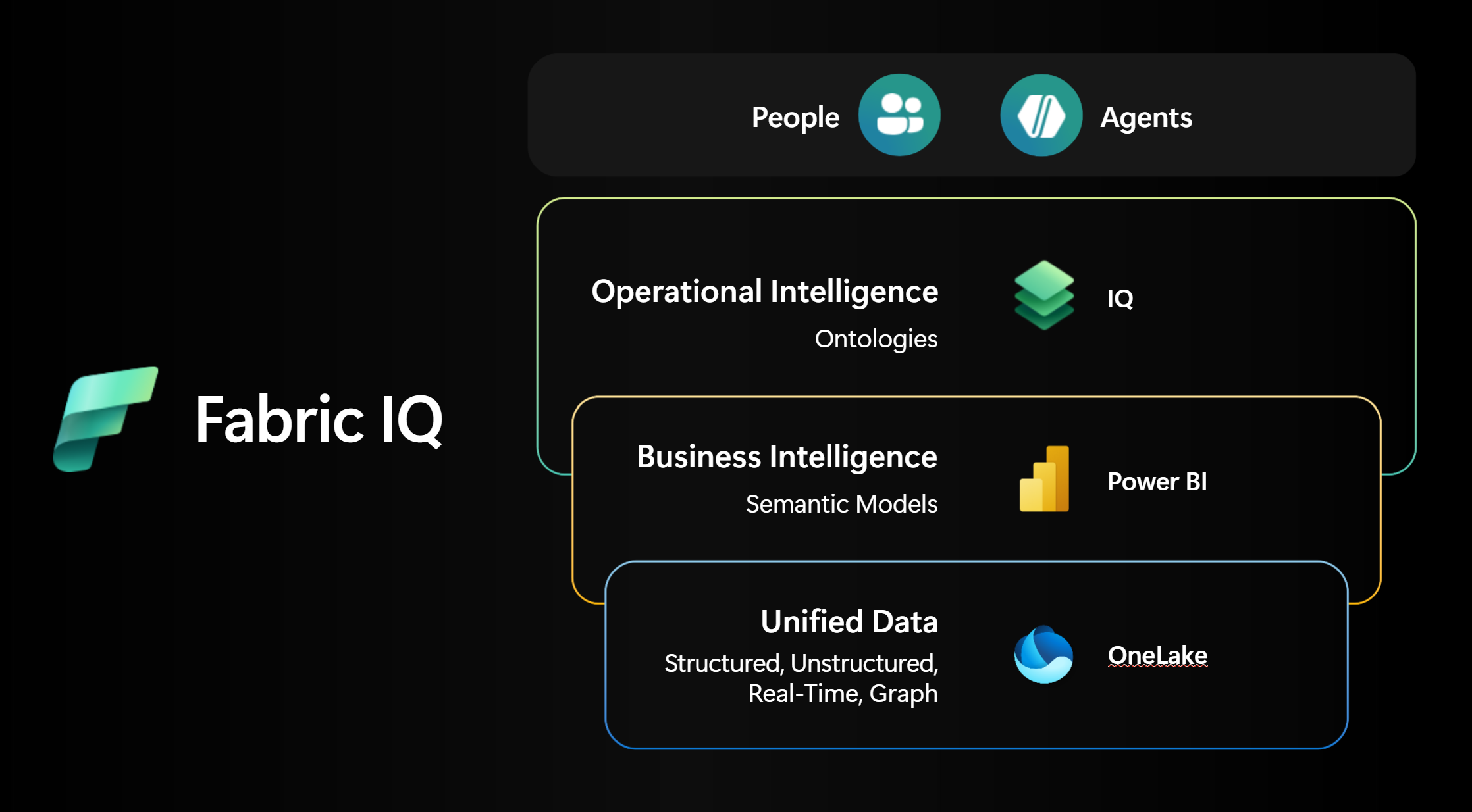
Fabric IQ හැදිලා තියෙන්නේ layers තුනකින්
Fabric IQ business context දෙන්නේ එකක් උඩ එකක් තියපු layers තුනකින්. ඔයා වැඩිපුරම කෙලින්ම අත ගහන layers දෙක Fabric වල core items දෙකකට ගැළපෙනවා — semantic model එකයි ontology එකයි. මේ දෙකම වාඩි වෙලා ඉන්නේ හැමෝටම පොදු අත්තිවාරම වෙන OneLake උඩ.

Fabric IQ වල layers තුන — යටින්ම තියෙන OneLake අත්තිවාරමේ ඉඳන් උඩම තියෙන operational intelligence දක්වා.
1. OneLake එක්ක එක තැනකට ආපු data
OneLake තමයි අත්තිවාරම. Clouds කීපයක, on-premises පවා විසිරිලා තියෙන ඔයාගේ enterprise data ඔක්කොම ඒක එකම, governed source of truth එකකට එකතු කරනවා. Shortcuts, mirroring, OneLake catalog පාවිච්චි කරලා, අපිට හුරු ඒ කෑලි කෑලි වෙච්ච data ප්රශ්නය නැති කරලා, වැඩ කරන්න එකම multicloud lake එකක් දෙනවා.
Data engineer කෙනෙක් විදියට මට මෙතන වැඩියෙන්ම වැදගත් වෙන්නේ shortcuts. Fabric IQ වලට පිටින් තියෙන operational data තියෙන තැනම තියාගෙන reference කරන්න පුළුවන් — copy කරන්න ඕන නෑ, තවත් ETL pipeline එකක් හදන්නත් ඕන නෑ. OneLake distribution layer එකත් වෙන නිසා, ඔයා එක පාරක් define කරන දේ Fabric, Foundry, Copilot Studio කියන හැම තැනකම එක විදියටම තියෙනවා.
2. Power BI semantic models එක්ක business intelligence
Power BI semantic models කියන්නේ ඔයා දැනටමත් දන්නවා ඇති curated analytics layer එක — measures, hierarchies, dimensions, විශ්වාස කරන්න පුළුවන් KPIs. Fabric IQ වල තියෙන දක්ෂම කොටස තමයි, ඔයා දැනටමත් production එකේ පාවිච්චි කරන semantic model එකකින් කෙලින්ම ontology එකක් generate කරගන්න පුළුවන් වීම. හිස් පිටුවකින් පටන් ගන්න ඕන නෑ; ඔයාගේ business එක දැනටමත් විශ්වාස කරන logic සහ definitions උඩ ඉඳන්ම පටන් ගන්න පුළුවන්. Customer, Shipment, Breach වගේ concept එකක් එක පාරක් define කරලා, ඕනම තැනක ආයෙ පාවිච්චි කරන්න.
3. Ontologies එක්ක operational intelligence
ඇත්තම රසවත් කොටස පටන් ගන්නේ Ontologies එක්ක. Ontology එකකින් ඔයාගේ business එකේ core entities, relationships, properties, rules, actions define කරනවා. Actions කියන ඒවා definition එකේම කොටසක් නිසා, agents ලාට තේරෙන්නේ දේවල් වල තේරුම විතරක් නෙවෙයි, ඒවට කරන්න පුළුවන් දේවලුත් — operations agents ලාට live data දිහා බලාගෙන ඉඳලා, anomalies අල්ලගෙන, governed action ගන්න පුළුවන්.
ඒ විතරක් නෙවෙයි, NL2Ontology layer එක හරහා සාමාන්ය English වලින්ම ontology එකක් query කරන්නත් පුළුවන්. ඒකෙන් වෙන්නේ ඔයා අහන business ප්රශ්නය පිටිපස්සෙන් structured query එකක් බවට හරවන එක. "ඉන්න, මම ඒකට SQL එකක් ලියලා දෙන්නම්" කියන කතාව එතනින් ඉවරයි.
Data engineer කෙනෙක් මේ ගැන හිතන්න ඕන ඇයි?
මූලික ප්රශ්නය ගැන අවංකව කතා කරමු. අපි data organize කරන්නේ tables සහ schemas විදියට, මොකද ඒක machines වලට පහසුයි. ඒත් business එක දුවන්නේ concepts උඩ. මේ දෙක අතරේ semantic layer එකක් නැත්නම්, ලොකු වගකීමක් තියෙන තීරණ ගන්න AI තාමත් සුදුසු නෑ, මොකද හැම ප්රශ්නයක්ම මුලින්ම මිනිහෙක් අතින් translate කරන්න වෙනවා. ඒ විදියට නම් scale කරන්න බෑ.
Fabric IQ ඔයාට පැහැදිලිව පේන වාසි තුනක් දෙනවා:
- Cross-domain reasoning. Concepts ඔක්කොම graph එකක් හරහා link වෙලා තියෙන නිසා, relationships දිගේ ගිහින් යම් ප්රතිඵලයක් ඇයි ආවේ කියලා පැහැදිලි කරන්න පුළුවන්. හොඳම උදාහරණය මේක:
Order → Shipment → Temperature Sensor → Cold Chain Breach. "මේ delivery එක නරක් වුණේ ඇයි?" කියන ප්රශ්නයට ඒ දාමයෙන්ම උත්තර ලැබෙනවා — tables පහක join එකක් අතින් ලියන්න ඕන නෑ. - ඉක්මන් onboarding. Business concept එකක් එක පාරක් declare කරාම, අලුතින් එන හැම dashboard එකකටම, agent එකකටම, app එකකටම ඒ තේරුමම උරුම වෙනවා. අලුත් experiences මුල ඉඳන්ම consistent business semantics එක්කම වැඩ කරනවා.
- Governance සහ trust. Teams අතරේ පොඩ්ඩ පොඩ්ඩ වෙනස් definitions පහළොවක් වෙනුවට තියෙන්නේ එකම definition එකයි. Concept layer එකටම ඇතුළත් කරපු constraints (types, ranges, uniqueness) නිසා, කාටවත් නොදැනීම data quality එක හොඳ වෙනවා. ඒත් Microsoft ම කියන ඇත්ත කතාවක් තියෙනවා: IQ layer එකෙන් පටන් ගන්න බෑ. මුලින්ම ශක්තිමත් data අත්තිවාරමක් ඕන. Fabric ඒක දෙන්නේ core capabilities හතරක් හරහා.

IQ layer එක හැකි කරන්න Fabric පාවිච්චි කරන capabilities හතර.
- Data estate එක එක තැනකට ගේන්න. Analytical සහ operational data — lakehouses, eventhouses, semantic models — එකම consistent model එකකට එකතු කරන්න. පිටින් තියෙන operational data OneLake shortcuts වලින් ඇතුළට ගන්න පුළුවන්, ETL ඕන නෑ.
- Data process කරලා harmonize කරන්න. Query acceleration සහ AI-powered analytics නිසා performance එක පස්සේ දුවන්න යන කාලය අඩුයි, insight දෙන්න වැඩි කාලයක් ඉතුරු වෙනවා.
- Semantic knowledge curate කරන්න. Customer හරි Asset හරි කියන එකට තියෙන එකම definition එකෙන් තමයි Power BI, notebooks, agents ඔක්කොම data තේරුම් ගන්නේ. පැටලිලි නෑ.
- AI agents ලාට බලය දෙන්න. Fabric IQ copilots සහ agents ලාට structured grounding එකක් දෙනවා. ඒ නිසා ඒ අය දෙන උත්තර අනුමාන නෙවෙයි — ඔයාගේ ontology එකේ define කරපු, ඔයාගේම enterprise භාෂාවෙන්.
Fabric ඇතුළේ IQ workload එක: මොන items ද තියෙන්නේ?
Fabric ඇතුළේ IQ (preview) කියන්නේ workload එකක් — business data එකතු කරලා ඒවට context එකක් දෙන්න පාවිච්චි කරන, එකිනෙකට සම්බන්ධ items ටිකක එකතුවක්. ප්රධාන items දෙක ontology එකයි semantic model එකයි. ඒත් ඒ context එක analyze කරන්න, පාවිච්චි කරන්න, ඇත්ත operations වලට ගේන්න තවත් items කීපයක්ම මේ workload එකට ඇතුළත්.
දැනගෙන ඉන්න වටින දෙයක් තියෙනවා: එක item එකක් workloads කීපයකට අයිති වෙන්න පුළුවන්. IQ items කීපයක් Real-Time Intelligence සහ Power BI එක්කත් බෙදාගෙන තියෙනවා, මොකද ඒවා scenarios කීපයකටම අදාළයි.
මෙන්න සම්පූර්ණ ලැයිස්තුව:
| Fabric item | මොකටද පාවිච්චි කරන්නේ |
|---|---|
| Ontology (preview) | ඔයාගේ business එකට පොදු වචන මාලාව define කරනවා — entity types, relationships, properties, rules. Cross-domain consistency එකටයි AI agents ලාටයි අත්තිවාරම වෙන grounding layer එක මේකයි. |
| Power BI semantic model | Measures, hierarchies, relationships එක්ක curated analytics models. විශ්වාස කරන්න පුළුවන් KPIs, ඉක්මනට load වෙන visuals. මේවායින් ontologies generate කරන්නත් පුළුවන්. (මේක Power BI item එකකුත් වෙනවා.) |
| Plan (preview) | Tools අතරේ මාරු වෙන්නේ නැතුව, එකම data අත්තිවාරමක් උඩ planning, forecasting, reporting කරන්න පුළුවන් no-code experience එකක්. |
| Graph (preview) | Connected data — nodes, edges, traversals — store කරලා query කරනවා. Impact chains, dependencies, shortest paths පිටිපස්සේ තියෙන engine එක මේකයි. (මේක Real-Time Intelligence item එකකුත් වෙනවා.) |
| Data agent | එක්තරා domain එකක් ගැන natural-language ප්රශ්නවලට උත්තර දෙන virtual analyst කෙනෙක්. ඔයාගේ semantic models සහ ontologies උඩ grounded. Microsoft 365, Foundry, Copilot Studio, custom apps වලට publish කරන්න පුළුවන්. (මේක Data Science item එකකුත් වෙනවා.) |
| Operations agent (preview) | Real-time data monitor කරලා business actions recommend කරනවා. ඔයාගේ business concepts හරහා හිතලා anomalies අල්ලගෙන, governed responses trigger කරනවා. (මේක Real-Time Intelligence item එකකුත් වෙනවා.) |
OneLake ගැන පොඩි සටහනක්: OneLake මේ ලැයිස්තුවේ "item" එකක් විදියට නැත්තේ, ඒක හැමදේටම යටින් තියෙන අත්තිවාරම නිසා. උඩ තියෙන හැම item එකක්ම OneLake tables natively read/write කරනවා.
Items එකිනෙකට ගැළපෙන්නේ කොහොමද
ඇත්ත මැජික් එක තියෙන්නේ මේ සම්බන්ධතාවල:
- Ontology + semantic model - concept එකක් එක පාරක් define කරලා, reports සහ agents පුරාම KPIs සහ terminology එක විදියටම තියාගන්න.
- Ontology + Graph - මොනවද එකිනෙකට සම්බන්ධ, ඇයි කියලා ontology එක කියනවා; Graph එක ඒ connections store කරලා ඒවා දිගේ යනවා (උදාහරණයක් විදියට, අවදානම් route එකක් හරහා ගිය shipment එකක් breach එකක් දක්වා trace කරන එක).
- Ontology + data/operations agents - ontology එක agents ලාව පොදු භාෂාවකට සහ rules වලට ground කරනවා. ඒ නිසා ඒ අය හරියට හිතනවා, guardrails ඇතුළේ ඉඳගෙනම ක්රියා කරනවා.
- Plan + semantic model - plan-versus-actuals සහ dynamic forecasting වලට Plan එක dimensions සහ measures ඇදලා ගන්නවා. සරලව කිව්වොත්: semantic models විශ්වාස කරන්න පුළුවන් KPIs දෙනවා, ontology එක ඒවට පොදු භාෂාව define කරනවා, Graph එක relationship analysis කරනවා, Plan එක insight එක action බවට හරවනවා, agents ලා live සහ historical data ගැන concepts තේරුම් අරගෙන කතා කරනවා.
Ontology එක ගැන ටිකක් ගැඹුරින් (මේ හැමදේකම හදවත)
Fabric IQ වල එක item එකක් විතරක් ගැඹුරින් ඉගෙන ගන්නවා නම්, ඒක ontology එක වෙන්න ඕන. ඒක ඔයාගේ business එකේ, machines වලටත් තේරෙන පොදු වචන මාලාව. මේක business context layer එකක් විදියට හිතන්න. ඒක ඇතුළේ ආයෙ ආයෙ පාවිච්චි කරන්න පුළුවන් concepts වල catalog එකක්, ඒ concepts ඇත්ත data එක්ක සම්බන්ධ කරන bindings, ඒවා එකිනෙකට සම්බන්ධ වෙන හැටි පෙන්වන graph view එකක්, ප්රශ්න අහන්න පුළුවන් query surface එකක් තියෙනවා.
Ontology එක හැදෙන මූලික කොටස් හතර
| Concept | මොකක්ද | එදිනෙදා උදාහරණයක් |
|---|---|---|
| Entity type | සැබෑ ලෝකයේ concept එකක, ආයෙ ආයෙ පාවිච්චි කරන්න පුළුවන් logical model එක. නම, identifiers, properties, constraints standardize කරනවා - ඒ නිසා "shipment" කියන්නේ හැමෝටම එකම දේ. | Customer, Shipment, Sensor |
| Entity instance | Entity type එකක ඇත්තටම තියෙන එක අවස්ථාවක්, ඔයාගේ data වලින් පිරෙන. ඒක හැදුවේ මොන source එකෙන්ද, ඒක ඇත්ත වුණේ කවදද කියලත් track කරනවා. | එක නිශ්චිත customer record එකක් |
| Property | Entity එකක් ගැන නමක් තියෙන කරුණක්, declare කරපු data type එකක් එක්ක. Types, units, naming ඔක්කොම එක විදියට තියාගන්න බල කරනවා. | Customer කෙනෙක්ගේ name සහ email |
| Relationship | Entities අතරේ type එකක් සහ දිශාවක් තියෙන link එකක්. ඒකට attributes (distance, confidence, validity) සහ cardinality rules තියෙන්නත් පුළුවන්. | Customer places Order (එක customer කෙනෙක්, orders ගොඩක්) |
මෙතන තියෙන ලොකු අදහස මේකයි: entity type එකක් concept එකක් කිසිම එක table එකකට සීමා නොවෙන්න උඩට ගන්නවා. ඔයාගේ sources පුරා විසිරිලා තියෙන, එකිනෙකට පටහැනි column-level definitions නැති වෙන්නේ ඒකෙන්. Relationships නිසා context එක පැහැදිලිව පේනවා, ආයෙ පාවිච්චි කරන්නත් පුළුවන් - හැම පාරම custom join logic ලියන්නේ නැතුව traversal සහ dependency analysis කරන්න පුළුවන්.
Data binding: concepts ඇත්ත data එක්ක යා කරන හැටි
Ontology එකක් define කරන එක වැඩෙන් බාගයක් විතරයි. ඒ definitions OneLake එකේ තියෙන ඇත්ත data - lakehouse tables, eventhouse streams, Power BI semantic models - එක්ක සම්බන්ධ කරන්නේ data binding වලින්. Binding එකකින් කියවෙන්නේ data types මොනවද, identity keys මොනවද, columns properties වලට map වෙන්නේ කොහොමද, sources කීපයක් පුරා keys relationships වලට map වෙන්නේ කොහොමද කියන එක.
Raw rows සහ events governed business objects බවට හැරෙන්නේ මේ පියවරේදී. ඒ එක්කම schema-evolution rules, quality checks (nullability, ranges, uniqueness), provenance කියන ඔක්කොම concept level එකේදීම ඇමිණෙනවා.
අමතක කරන්න එපා: Upstream sources වල වෙන updates (අලුත් rows වගේ) ඉබේම පේන්නේ නෑ. ඒවා පේන්න නම් ontology එකේ graph model එක manually refresh කරන්න ඕන.
Ontology graph එක
Data bind කරාට පස්සේ ඔයාට query කරන්න පුළුවන් instance graph එකක් ලැබෙනවා: nodes කියන්නේ entity instances, edges කියන්නේ ඒවා අතරේ තියෙන links (asserted හෝ derived). හැම එකක් එක්කම source lineage එකත් එනවා. ඔයාගේ ඇත්ත business data උඩ business context එක visually explore කරන්නත්, graph algorithms - paths, centrality, communities - run කරන්නත් පුළුවන් වෙන්නේ මේ නිසා.
Graph feature එක වැඩ කරන්නේ Graph in Microsoft Fabric උඩ. ඒ නිසා Graph tenant setting එක enable කරලා තියෙන්න ඕන (ඒ ගැන පහළින් කියන්නම්).
NL2Ontology එක්ක ප්රශ්න අහන හැටි
Business users ලා වැඩියෙන්ම කැමති වෙන කොටස මේක. Ontology querying හරහා, bind කරපු sources උඩ business terms වලින්ම business-level ප්රශ්න අහන්න පුළුවන්. Entity type එකකින් පටන් අරන්, properties වලින් filter කරලා, relationships දිගේ ගිහින්, කාලය අනුව aggregate කරන්න පුළුවන්.
යටින් තියෙන engineering එකත් හරිම දක්ෂයි: ontology layer එක ඔයාගේ query එක වඩාත්ම efficient system එකට ඉබේම route කරනවා - Graph එකට GQL, Eventhouse එකට KQL - ඒ නිසා data physically තියෙන්නේ කොහෙද කියලා ඔයා දැනගන්න ඕන නෑ. ඒ වගේම NL2Ontology layer එක සාමාන්ය English ප්රශ්න structured queries බවට හරවනවා. එහෙම කරද්දී filters, joins, units, validity windows ඔයා publish කරපු definitions එක්ක ගැළපෙනවද කියලත් බලාගන්නවා.
මේක on කරගන්න කලින් ලෑස්ති කරගන්න ඕන දේවල් (prerequisites)
මොනවා හරි හදන්න කලින්, යටින් තියෙන බට ටික හරියට සෙට් වෙලා තියෙන්න ඕන. ඇත්තටම ඕන වෙන දේවල් ටික, කිසි වසන් කිරීමක් නැතුව මෙන්න.
ඔයාට ඕන වෙනවා:
-
Fabric-enabled capacity එකක් උඩ දුවන workspace එකක්. ඔයා හදන හැමදේටම එකම workspace එක පාවිච්චි කරන්න.
-
Admin portal එකේ ඕන කරන tenant settings on කරලා දෙන්න Fabric administrator කෙනෙක්. Enable කරන්න ඕන tenant settings ටික (admin portal → tenant settings):
-
Enable Ontology item (preview) - ontology items හදන්න නම් මේක අනිවාර්යයි.
-
User can create Graph (preview) - මේකත් අනිවාර්යයි, මොකද ontology graph එක දුවන්නේ මේක උඩ.
-
Users can create and share Data agent item types (preview) - data agent එකක් පාවිච්චි කරනවා නම් ඕන.
-
Users can use Copilot and other features powered by Azure OpenAI - AI/NL features වලට ඕන.
-
Data sent to Azure OpenAI can be processed outside your capacity's region - NL2Ontology සහ agents වලට.
-
Data sent to Azure OpenAI can be stored outside your capacity's region - ඒකටමයි.

Admin portal එකේ "Enable Ontology item (preview)" on කරන හැටි.

Graph setting එක - මේක මඟ ඇරියොත්, අලුත් ontology එකක් open කරපු ගමන්ම errors එනවා.
Graph setting එක මඟ ඇරියොත්, ontology එක හදද්දී හැමදේම හරි වගේ පේන්න පුළුවන්. ඒත් ඒක open කරද්දී "Unable to create the Ontology (preview) item" වගේ error එකක් එනවා. ඒ නිසා ontology setting එකයි graph setting එකයි දෙකම එකට enable කරන්න.
අපි පළමු ontology එක හදමු (hands-on)
Official tutorial එකේ පාවිච්චි කරන්නේ Lakeshore Retail කියන කල්පිත company එකක් - sales data වගේම freezer streaming data තියෙන ice cream විකුණන business එකක්. එතනදී ඔයා Store, Products, SaleEvent වගේ entity types හදනවා, Eventhouse එකෙන් streaming freezer temperature bind කරනවා, "හැම store එකක්ම ගත්තම revenue අතින් ඉහළින්ම ඉන්න product එක මොකක්ද?" වගේ ප්රශ්නවලට උත්තර හොයනවා.
Ontology එකක් හදන්න ක්රම දෙකක් තියෙනවා. මොකක්ද තෝරගන්න ඕන කියන එක රඳා පවතින්නේ ඔයා ළඟ දැනටමත් මොනවද තියෙන්නේ කියන එක මත:
- Semantic model එකකින් generate කරන එක - හොඳට හදපු Power BI semantic model එකක් දැනටමත් තියෙනවා නම් මේක තමයි හොඳම. ඉක්මනින්ම යන්න පුළුවන් පාර; ඒකෙන් පටන් අරන් ඕන විදියට extend කරගන්න පුළුවන්.
- OneLake එකෙන් කෙලින්ම හදන එක - semantic model එකක් නැත්නම්, එහෙම නැත්නම් මුල ඉඳන්ම design එක සම්පූර්ණයෙන් ඔයාගේ අතේ තියාගන්න ඕන නම් මේක තමයි හොඳම. අපි මේ ක්රම දෙකම බලමු. මුලින්ම, දෙකටම පොදු setup එක.
Step 0 - Sample data ලෑස්ති කරගමු
Fabric samples GitHub repo එකෙන් sample CSVs ටික download කරගන්න: DimStore.csv, DimProducts.csv, FactSales.csv, Freezer.csv, FreezerTelemetry.csv.
Lakehouse එක ලෑස්ති කරගන්න:
- ඔයාගේ workspace එකේ
OntologyDataLHකියලා අලුත් Lakehouse එකක් හදන්න. - Ribbon එකෙන් Get data → Upload files තෝරලා CSVs හතරක් upload කරන්න:
DimProducts,DimStore,FactSales,Freezer. (FreezerTelemetry.csvපස්සේ Eventhouse එකට ඕන වෙන නිසා දැනට පැත්තකින් තියන්න.) - හැම file එකකටම ... → Load to Tables → New table තෝරන්න, defaults එහෙමම තියන්න.

CSVs delta tables වලට load කරාට පස්සේ lakehouse එක පේන හැටි (table names එන්නේ simple අකුරින්).
Semantic model එක ලෑස්ති කරගන්න (semantic model පාරෙන් යනවා නම් විතරයි):
- Lakehouse ribbon එකෙන් New semantic model තෝරලා, ඒකට
RetailSalesModelකියලා නම දාලා, tables තුනක් තෝරන්න:dimproducts,dimstore,factsales. (freezerදාන්න එපා — ඒක පස්සේ අපි manually එකතු කරනවා.) - Model එක Editing mode එකේ open කරලා, Manage relationships පාවිච්චි කරලා relationships දෙකක් හදන්න:
| From table | To table | Cardinality | Cross-filter | Active ද? |
| --- | --- | --- | --- | --- |
|
factsales(StoreId) |dimstore(StoreId) | Many to one (*:1) | Single | ඔව් | |factsales(ProductId) |dimproducts(ProductId) | Many to one (*:1) | Single | ඔව් |

Relationships දෙකම define කරලා ඉවරයි — දැන් මේ model එකෙන් ontology එකක් generate කරන්න ලෑස්තියි.
Eventhouse එක ලෑස්ති කරගන්න (live freezer data වලට):
TelemetryDataEHකියලා අලුත් Eventhouse එකක් හදන්න (ඒ නමින්ම KQL database එකකුත් ඒ එක්කම හැදෙනවා).- KQL database එක open කරලා, Get data → Local file ගිහින්,
FreezerTelemetry.csvඑකෙන්FreezerTelemetryකියලා අලුත් table එකක් හදන්න.
Streaming telemetry table එක Eventhouse එකේ - පස්සේ bind කරන්න ලෑස්තියෙන් තියෙනවා.
Path A - Semantic model එකකින් ontology එකක් generate කරමු
මේක තමයි කෙටි පාර. Fabric ඔයාගේ semantic model එක කියවලා, ontology එකේ මූලික සැකිල්ල ඔයා වෙනුවෙන් හදලා දෙනවා.
1. Generate කරන්න. RetailSalesModel semantic model එක open කරන්න. උඩ ribbon එකේ තියෙන Generate Ontology click කරන්න.

ඔයා දැනටමත් විශ්වාස කරන logic එකෙන් ontology එකක් පටන් ගන්න එක button එකයි.
2. නමක් දෙන්න. ඔයාගේ workspace එක තෝරලා, RetailSalesOntology කියලා නම දාලා, Create click කරන්න.
නම් දාද්දී මතක තියාගන්න: Ontology names වලට letters, numbers, underscores විතරයි පාවිච්චි කරන්න පුළුවන් - spaces, dashes බෑ.
Ontology එක ලෑස්ති වුණාම ඒක ඉබේම open වෙනවා.

අලුතින්ම generate වුණු ontology එක — දැන් ඒක හදපු දේවල් check කරලා ටිකක් ඔප දාන්න ඕන.
3. Entity types check කරලා rename කරන්න. Generator එක entity types වලට දාන්නේ tables වල නම්මයි (factsales, dimstore, dimproducts). ඒවට මිනිස්සුන්ට කියවලා තේරෙන නම් දෙන්න:
| පරණ නම | අලුත් නම |
|---|---|
factsales | SaleEvent |
dimstore | Store |
dimproducts | Products (GQL reserved word එකක් වෙන PRODUCT එක්ක ගැටෙන්නේ නැති වෙන්න plural විදියට) |

Rename කරාට පස්සේ entity types තුන.
Entities එකක්වත් පේන්නේ නැත්නම්, semantic model එක publish කරලාද, tables hide කරලා නැද්ද, relationships define කරලාද කියලා බලන්න.
4. Properties සහ keys check කරන්න. හැම entity type එකකම බලාපොරොත්තු වෙන columns තියෙන්න ඕන. පොඩි අවුලක් තියෙනවා: SaleEvent එකට key එකක් auto-import වෙන්නේ නෑ, ඒ නිසා ඒක manually දාන්න ඕන - SaleEvent open කරලා, Add entity type key තෝරලා, SaleId select කරන්න. (Store එකේ key එක StoreId, Products එකේ ProductId.)
5. Bindings check කරන්න. Bindings tab එකට ගිහින්, හැම entity type එකක්ම ඒකේ source table එකට හරියට සම්බන්ධ වෙලාද කියලා තහවුරු කරගන්න (SaleEvent → factsales, Store → dimstore, Products → dimproducts).
6. Relationships configure කරන්න. Relationships define වෙලා එනවා, ඒත් සම්පූර්ණයෙන්ම wire වෙලා නෑ. මේ විදියට ගැළපෙන්න update කරන්න:
| අලුත් නම | Source table | Source entity (column) | Target entity (column) |
|---|---|---|---|
soldIn | factsales | Products (ProductId) | SaleEvent (SaleId) |
has | factsales | Store (StoreId) | SaleEvent (SaleId) |

Source columns වලට bind කරපු relationship එකක් — context එක දැන් පැහැදිලිව පේනවා.
Path B - OneLake එකෙන් කෙලින්ම ontology එකක් හදමු
Semantic model එකක් නැද්ද? කමක් නෑ. ඒ දේම අතින් හදාගන්න පුළුවන්, ඒකෙන් හැමදේම ඔයාගේ පාලනයට එනවත් එක්ක. පියවර යන පිළිවෙළ මෙහෙමයි: ontology item එක හදනවා → entity types හදනවා → data bind කරනවා → keys set කරනවා → relationships හදලා bind කරනවා.
1. Ontology item එක හදන්න. Workspace එකේ + New item click කරලා, Ontology (preview) කියලා search කරලා, ඒක select කරන්න.

මුල ඉඳන්ම ontology එකක් හදන හැටි.
ඒකට RetailSalesOntology කියලා නම දාලා Create click කරන්න. වැඩ කරන්න හිස් canvas එකක් ලැබෙනවා.
2. පළමු entity type එක (Store) එකතු කරන්න. Ribbon එකෙන් හරි canvas එකෙන් හරි Add entity type click කරලා, ඒකට Store කියලා නම දෙන්න.

Entity type එකක් manually එකතු කරන හැටි.
ඊට පස්සේ Bindings tab එකේ Add data to entity type තෝරලා, OntologyDataLH lakehouse එකට connect වෙලා, dimstore table එක තෝරන්න. Binding type එක Static විදියටම තියලා, columns ඉබේම map වෙන්න ඉඩ දීලා, Save කරන්න. අන්තිමට Add entity type key ගිහින් StoreId select කරන්න.
3. අනිත් entity types එකතු කරන්න. මේ දෙකටත් ඒ පියවරම ආයෙ කරන්න:
| Entity type | Source table | Key |
|---|---|---|
Products (plural) | dimproducts | ProductId |
SaleEvent | factsales | SaleId |
4. Relationships හදන්න. Add relationship click කරලා එකින් එක define කරන්න, ඊට පස්සේ ඒ හැම එකක්ම factsales එකේ source columns වලට bind කරන්න:
| Relationship | Source entity (column) | Target entity (column) |
|---|---|---|
has | Store (StoreId) | SaleEvent (SaleId) |
soldIn | Products (ProductId) | SaleEvent (SaleId) |

Relationships දෙකම SaleEvent එකට යොමු වෙලා — generate කරපු පාරෙන් ආපු ප්රතිඵලයමයි, වෙනස අතින් හැදුවා විතරයි.
මොන පාරෙන් ගියත්, දැන් ඔයාට entity types, properties, keys, relationships පිරුණු ontology එකක් තියෙනවා. මෙතනින් එහාට tutorial එක live freezer telemetry එකෙන් ඒක enrich කරනවා (static data සහ time-series data දෙකම bind කරලා). ඊට පස්සේ graph එක හරහාත්, data agent එකක් හරහා natural-language queries වලිනුත් ඒක explore කරනවා.
ඇත්තටම මේක අතට ගන්න ඕන කවදද?
Fabric IQ හැම reporting වැඩකටම ඕන දෙයක් නෙවෙයි. ඒකේ වටිනාකම ඇත්තටම පේන්නේ මේ වගේ වෙලාවට:
- ඔයාට cross-domain consistency ඕන නම් - teams ගොඩක්, tools ගොඩක් පුරා එකම concept එක පිරිසිදුව පාවිච්චි වෙන්න.
- ඔයා governance ගැන හිතනවා නම් - විශ්වාස කරන්න පුළුවන් එකම definition එකක්, quality එක රකින constraints එක්කම.
- ඔයා AI agents ලාව ground කරනවා නම්, ඒ අය joins hallucinate කරන්නේ නැතුව ඔයාගේ business එකේ භාෂාවෙන්ම කතා කරන්න ඕන නම්.
- ඔයාගේ තීරණ flat aggregations වලට වඩා relationships සහ impact chains මත රඳා පවතිනවා නම්. ඔයාට ඕන එක star schema එකක් උඩ හදන එක dashboard එකක් විතරක් නම්, සාමාන්ය semantic model එකක් හොඳටම ඇති. ඒත් agentic experiences හදන්න පටන් ගත්ත ගමන්, එහෙම නැත්නම් හැම team එකක්ම "active customer" කියන එක තමන්ට ඕන විදියට ආයෙ ආයෙ define කරන එක දැකලා ඔයාට එපා වෙලා නම්, ontology layer එක දාපු මහන්සියට වඩා වැඩිය ආපහු දෙන්න පටන් ගන්නවා.
අන්තිමට, කෙටියෙන්ම
Fabric IQ කියන්නේ හැම data team එකක්ම කවදහරි මුහුණ දෙන ප්රශ්නයකට Microsoft දෙන උත්තරය: පොදු තේරුමක් නැති data වලින් AI දක්වා scale වෙන්න බෑ. ඒක එක තැනකට එකතු කරපු OneLake අත්තිවාරම උඩ ඉඳගෙන, ඔයා දැනටමත් විශ්වාස කරන Power BI semantic models ආයෙ පාවිච්චි කරනවා. ඊට උඩින් tables ඔයාගේ business එකේ ඇත්ත භාෂාවට හරවන ontology layer එකක් එකතු කරනවා - relationships, rules, graph එකක්, natural-language querying කියන ඔක්කොම එක්කම.
Data engineers විදියට අපිට මේකේ තියෙන ආකර්ෂණීයම දේ තමයි, දැනට තියෙන දේවල් කොච්චර ටිකක් විතරක් විසි කරන්න වෙනවද කියන එක. හොඳ semantic model එකක් තියෙනවද? එක click එකකින් ඒකෙන් ontology එකක් generate කරගන්න. හැමදේම ඔයාගේ අතේ තියාගන්න කැමතිද? OneLake එකෙන් අතින්ම හදන්න. මොන විදියට ගියත්, අන්තිමට ඔයාට ලැබෙන්නේ governed, query කරන්න පුළුවන්, agents ලාට ලෑස්ති, ඔයාගේ business එකේ එකම model එකක් - ඒ එක්කම ඔයාට තවදුරටත් මිනිස් translation layer එක වෙලා ඉන්න ඕන වෙන්නේ නෑ.
මේක තාම preview එකේ නිසා, තැනින් තැන අඩුපාඩු එයි කියලා හිතාගෙනම ඉන්න. ඒත් යන දිශාව පැහැදිලියි, ඒ නිසා අතින්ම කරලා බලලා මේක ඉගෙන ගන්න පටන් ගන්න මේක ඇත්තටම හොඳ වෙලාවක්.